Showing posts with label Technology. Show all posts

Day 15 - Cathode Ray Tube

Description

Cathode Ray Tube (CRT) is a vacuum tube that contains electron gun to beam and display images on a phosphorescent screen. The images is displayed on screen by using technology called rastering. (The image displayed line by line in fixed pattern) CRT were used to as a display monitor in older times and now were completely obsolete and replaced by newer Plasma and LCD monitor technology.

CRT display monitors usually very thick and heavy due to the internal construction. The screen must be coated with a lead glass to block off any X-ray emission.


Advantages

- No native resolution
- No input lag
- High contrast ratio
- Works with light guns
- Longer shelf time
- Can store in extreme temperature without degrading the monitor

Disadvantages

- Heavy and bulky
- Higher power consumption rate
- Very dangerous to repair
- Contains poisonous material such as lead
- Sensitive to magnetic interference

This article is referred from Wikipedia's Cathode Ray Tube article.
Day 5 - GUID Partition Table (GPT)

GUID Partition Table

GPT is a new way to handle a file system that could possibly replace the older standard MBR. It should be used on an UEFI (Unified Extensible Firmware Interface) system, although some BIOS (Basic Input Output System) system do support GPT file system

Features

GPT superseded MBR with the following features:
- GPT breaks the MBR partition limit of 2 TiB to virtually unlimited 18 EB (~18,000,000 TB)
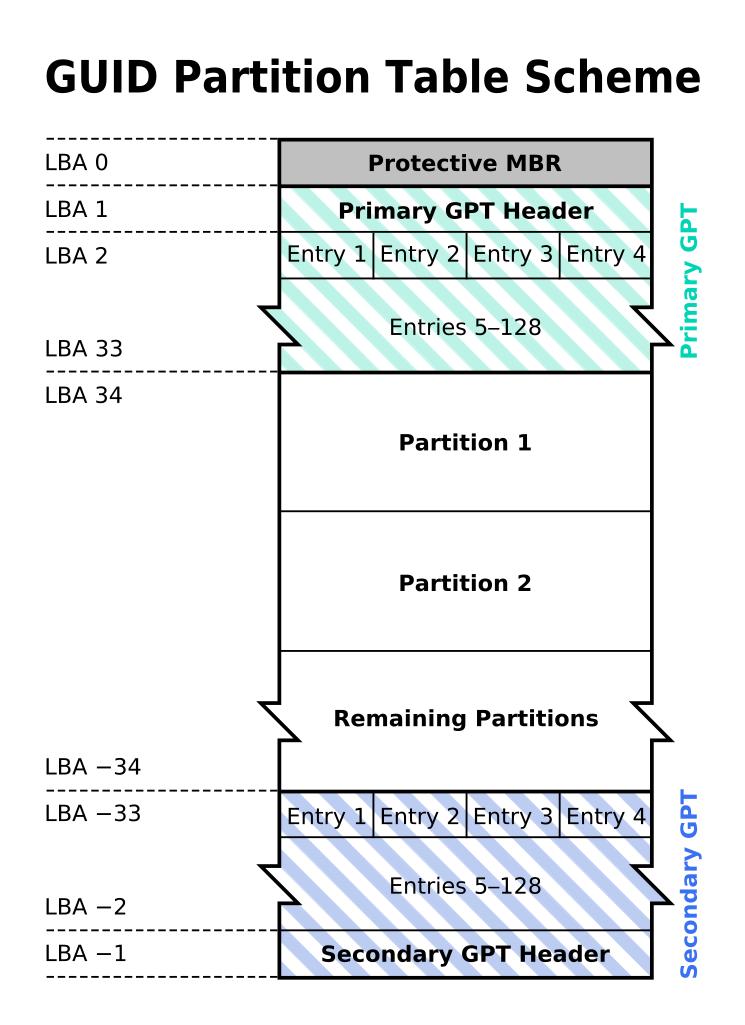
- GPT allows up to 128 primary partitions to be made
- A protective MBR sector will be located at sector 0, the most front of the partition to prevent MBR-only operating system mistaken the the GPT as unpartitioned and overwrite everything in the GPT
- It stores critical files on after the protective MBR and end of partition to increase redundancy
- It contains cyclic redundancy check (CRC) to check for corrupted files and attempt to repair it

Compatibility

Most newer versions of operating systems supports reading and writing file on a GPT file system.

Support both read/write and booting from GPT (BIOS and UEFI):
- Windows Vista and 7 (64 bit only), 8, 8.1 and 10 (32 bit and 64 bit)
- Windows Server 2003 (IA-64), 2008, 2008 R2, 2012 and 2016 (IA-32)

Complete support for GPT:
- Windows Server from 2003 to 2016 that uses IA-64 architecture
- OS X since 10.4 (Only for Intel Macintosh Computer)
- Linux, Fedora since version 8 and Ubuntu since version 8.4
- FreeBSD since version 7.0
- Solaris since Solaris 10

This article is referred from Wikipedia's GUID Partition Table article.

Day 4 - Master Boot Record (MBR)

Master Boot Record


MBR is an older way to handle file system. MBR exist since 1983, even before Microsoft Windows exist. MBR contains the information about how the file system be handled. It also holds the bootloader. Optionally it contains 32-bit disk time stamp and signature.

Limitations

MBR has a few limitation, which is the reason why MBR is superseded by GPT (GUID Partition Table). The limitations are:
- MBR can only handle maximum hard disk size of 2 TiB (~2.2 TB).
- MBR can only have maximum of 4 primary partition, or 3 primary partition and 1 extended partition. (The extended partition can contains unlimited amount of logical partitions, but logical partition cannot be booted.)

This article is referred from Wikipedia's Master Boot Record article.

Day 2 - Scalable Link Interface (SLI)

Scalable Link Interface

Scalable Link Interface (SLI) is a nVidia brand name of technology combining 2 to 4 graphic cards to produce one single video output. 
Graphic cards will be setup in a master-slave mode, one card will be the master and others will work for the master card. For example, a 3 way SLI setup will have 3 cards. The first card will be the master and others will be slave. All cards will divide the workload accordingly and when the slave cards finished their processing, they will output the result to master card and master card will then output all the result to a projecting device.
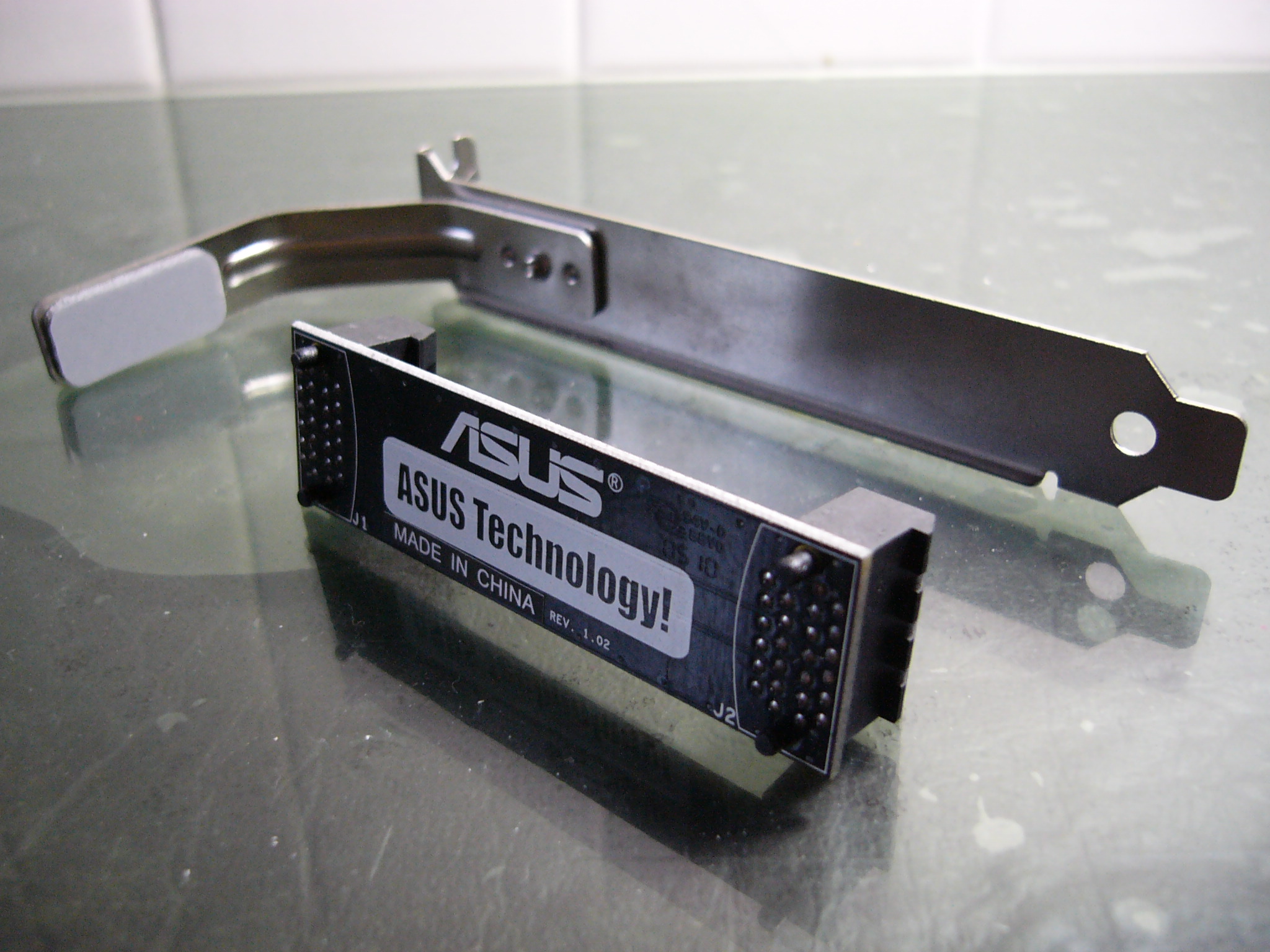
To reduce the latency between master and slave cards, a SLI bridge is used to reduce the bandwidth constrain and able to send data between two cards directly. SLI will work without the bridge but performance for high-end cards could suffer due to not enough bandwidth.

AMD has similar technology called AMD CrossFireX.

Modes available 

There are a few modes to configure the SLI, two of which is Split Frame Rendering (SFR) and Alternating Frame Rendering (AFR).

SFR works by splitting the workload of a frame equally to each card. For example, a frame with clear sky and some building can be split by a 7 to 3 ratio, since rendering the sky doesn't require much more processing power than the buildings, some extra building workload will be given to the card that render the sky.

AFR on the other hand renders by dividing the frame need to render to each card. For example, to render 60 frames, 30 frames will render by the first card and another 30 frames will render by the second card.

SLI can also use to double the anti-aliasing (AA) performance by splitting the workload.

This article is referred from Wikipedia's Scalable Link Interface article.