Showing posts with label Networking. Show all posts

Day 12 - Simplex, Full Duplex and Half Duplex

Description

Simplex means the information is sent one way only, usually from the sender A to receiver B and cannot be switched back. Duplex means the information can be send both way, from A to B or B to A, or both at the same time.

The word simplex might be derived from 'Sim' which means 'Simple' and 'plex' which means 'Part of' or 'Structure'. The word duplex is derived from 'Du' which means 'Duo' and 'plex' which means 'Part of' or 'Structure'.

Simplex

Simplex sends the information one way only and the path is fixed. Examples are TV and radio broadcasting, where the receiver only receive but not send information.
Full Duplex

In full duplex, both parties can communicate simultaneously. Telephone is a type of full duplex communication tool, as both parties can be both sender and receiver (To speak and heard at the same time).

Half Duplex

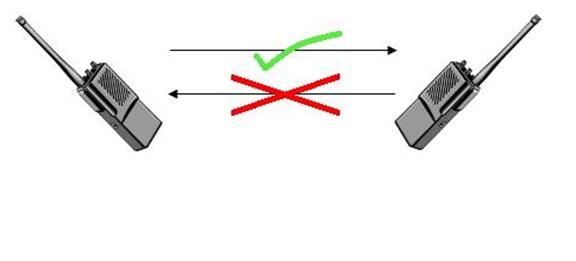
Half duplex the other hand allows information to flow both way, but not simultaneously, which is, one party is the sender while another must be the receiver. Walkie-talkie is a half duplex communication tool, as a talker will push a button called 'Push-to-talk' to turn off the receiver but turn on the transmitter.

This article is referred from Wikipedia's Simplex communication and Duplex (telecommunications) article.

Day 9 - Open Systems Interconnection model

Description

Open Systems Interconnection or OSI for short, is a conceptual network model that standardize the communication function in a system. The goal is to intercorporate all communication systems into one model using standard protocol. This model is very similar to the networking model of TCP/IP but the difference here is it has 7 layers instead of 4 in TCP/IP.

Layer 1: Physical Layer

It mostly deal with raw data. The data is transported using electrical impulse, light or radio wave physically. It also define the transmission mode and the use of network topology. Ethernet is one of the physical layer entity.

Layer 2: Data Link Layer

Data are encoded and decoded into bits here. It also contains Media Access Control (MAC) and Logic Link Control (LLC). MAC handles the network access permission while LLC handles the flow control and do error checking. Point-to-Point-Protocol is one of the data link layer entity.

Layer 3: Network Layer

Everything about network are handled here. Packet switching (Switch from a message to several packets), routing of packets and virtual circuit for node to node networking can be found here. Other features such as addressing, error handling and congestion control works together here. Internet Protocol is one of the network layer entity.

Layer 4: Transport Layer

This is the layer that manages where to flow the datagram and avoid possible congestion. It also detect datagram error. Transmission Control Protocol (TCP) is one of the transport layer entity.

Layer 5: Session Layer

This layer manage the connection between application. For example, session layer can establish a
connection if the connection is lost. Remote Procedure Calls (RPC) is one of the session layer entity.

Layer 6: Presentation Layer

Presentation layer translate normal text from application to network format and vice versa. This layer will change the data format and encrypt it. Encryption is one of the presentation layer entity.

Layer 7: Application Layer

This layer can interact with users directly. This layer provides mailing services, file transfer and Internet browsing. File Transfer Protocol (FTP) is one of the application layer entity.


This article is referred from Wikipedia's OSI model article. (With a few sub-articles)

Day 8 - Internet Protocol Suite (TCP/IP)

Description

Internet Protocol Suite, or famously known as TCP/IP, is a model of networking layering consists of 4 layers which is Application layer, Transport layer, Internet layer and Link layer. Each layer is represented with a protocol for data transmission. The most important layer is Transport layer and Internet layer as it consist of both TCP and IP protocol, which ensure data is sent and received successfully.

Application layer

This is the top most layer in Internet Protocol Suite. It is the layer where data were processed to sent and after receiving. Programs and applications can only access and exchange data in this layer. Examples of protocol belonged in this layer are HyperText Transfer Protocol (HTTP), File Transfer Protocol (FTP) and Simple Mail Transfer Protocol (SMTP).

Analogy: This is the place where you send or receive a pascal to or from oversea in post office.

[ Sender's Post Office ] [ Sorting Area ] → [ Sender's country van ] → [ Ships oversea] ↓
[ Receiver's Post Office ] [ Sorting Area ] ← [ Receiver's country van ] ← [ Ships oversea ]

Transport layer

This is the second layer in Internet Protocol Suite. Data from or to Application layer is processed here. Transport layer assign the destination for the data. When transport layer recieved a data, it will transport the data to correct application layer protocol. Examples of transport layer are Transmission Control Protocol (TCP) and User Datagram Protocol (UDP)

Analogy: This is where your pascal will be sorted and organized before shipping into a van to deliver it.

[ Sender's Post Office ] [ Sorting Area ] [ Sender's country van ] → [ Ships oversea] ↓
[ Receiver's Post Office ] [ Sorting Area ] [ Receiver's country van ] ← [ Ships oversea ]

Internet layer

The third layer of Internet Protocol Suite. It routes the data through network to it's destination. It also find for another route when the original route is having problem. Example of this layer is Internet Protocol (IP).

Analogy: This is where a van will deliver your pascal to the dock where ships will deliver the pascal oversea.

[ Sender's Post Office ] → [ Sorting Area ] [ Sender's country van ] [ Ships oversea] ↓
[ Receiver's Post Office ] ← [ Sorting Area ] [ Receiver's country van ] [ Ships oversea ]

Link layer

This is the lowest layer of Internet Protocol Suite. It is the layer where data transmit through the connection physically through wires. Example for this layer is ARP (Address Resolution Protocol) and Ethernet.

Analogy: This is the place where a ship will deliver your pascal oversea to another location.

[ Sender's Post Office ] → [ Sorting Area ] → [ Sender's country van ] [ Ships oversea]
[ Receiver's Post Office ] ← [ Sorting Area ] ← [ Receiver's country van ] [ Ships oversea ]

This article is referred from Wikipedia's Internet protocol suite article. (With a few sub-articles)

Day 1 - Onion routing

Onion Routing

Onion routing is a method of transferring a message through computer networks anonymously. The anonymity is done by encapsulating the message by layers of encryptions, just like layers on onion. To decrypt the onion message, the sender pick a series of nodes to route the onion. This series of nodes is called a chain, the first node is called entry node and the last node is called exit node.
When the sender send the onion message to the entry node, the entry node will only decrypt the onion message, pealing off the first layer of encryption to reveal the next destination. It will not know whether the previous node is actually the sender, or just one of the node in the chain, therefore it would not be able to know where the location of sender, but only the location for the next node. After the first layer of node had been decrypted, the onion message will send to the second node in the chain to decrypt, and send to the third node in the chain... until the exit node, which reveal the message. The message will then send to the receiver by the exit node.

Disadvantages 

Even this technique of encryption will increase the anonymity of the sender, hiding the origin of the sender, some ISP can trace and log the connection between two computers/node. The information such as the time the connection occur and the amount of data sent can be seen by ISP. For example, sender send an onion message on 0 seconds and the size is 50 kilobytes. ISP will log the connection between the sender and the entry node. Then, the entry node receives, decrypt and send the message with the size exactly 50 kilobytes to the next node. A few second later, the node received the exact same 50 kilobytes of the file... By this, ISP can determine the connection from entry node to exit node.

Secondly, the exit node can be compromised to see the raw message. The job of the exit node is to reveal the last encryption and send the raw message to the receiver. Therefore, the exit node could be compromised and crackers can extract the raw message from it, possibly containing passwords, personal identity and bank accounts.

This article is referred from Wikipedia's Onion routing article.